The better your site structure, the better your chance of higher
ranking in the search engines. Every website has some “structure.” It
might be a rigorous and streamlined structure, or it may be a
disorganized jumble of pages. If you are intentional and careful with
your site structure, you will create a site that achieves search
excellence.
In this article, I share some of the best advice on creating a
powerful site structure. The tips below will help you create a site that
appeals to users, gets crawled and indexed by spiders, and delivers the
best SERP listings and rankings possible.
Why Structure Matters
As I’ve worked with hundreds of clients over the years, I’ve been
surprised at how often site structure is overlooked. On the one hand,
it’s one of the most crucial aspects of a site’s SEO performance, but on
the other hand, few webmasters and owners understand what it means to
have a site structure that enhances SEO.
I’m going to share a few of the reasons why site structure is so
crucial, and then get into the how-to of developing your own
SEO-friendly site structure.
A good site structure means a great user experience.
When you take away the colors, the fonts, the kerning, the graphics,
the images, and the white space, good site design is really about a
great structure.
The human mind craves cognitive equilibrium — being able to put
pieces logically together, finding things where they’re expected, and
locating what they are seeking. Thus, a strong and logical site
structure is cognitively satisfying to users.
As you know, the more appealing your site to users, the more appealing it is to search engines, too. Google’s algorithm uses information from searchers
to rank your site. If your site has poor CTRs and low dwell time, it
will not perform well in the SERPs. By contrast, when a user finds a
site that they like — i.e. a site with great structure — they don’t
bounce and they stay longer. An accurate site structure can reduce
bounce rate and improve dwell time, both of which will lead to improved
rankings.
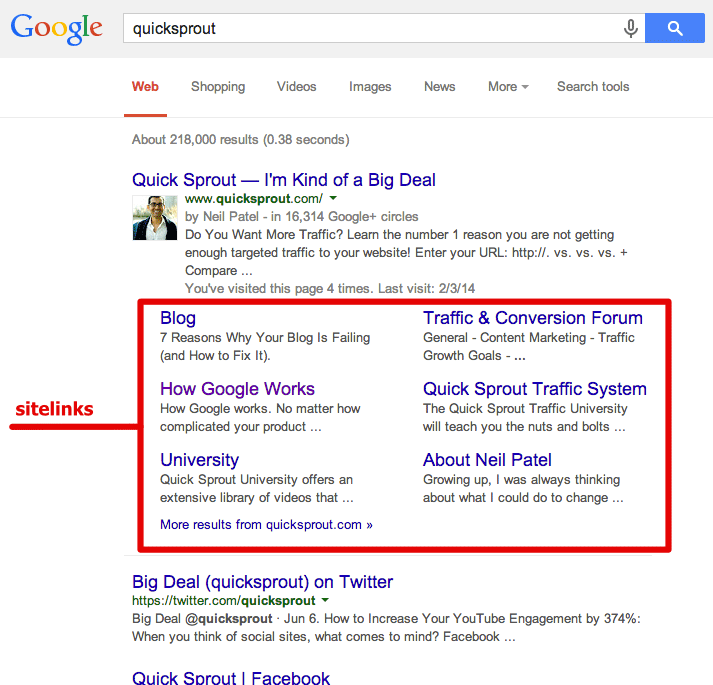
A good site structure provides your site with sitelinks.
Sitelinks are a listing format in the SERPs that show your site’s
main page along with several internal links indented below. You’ve seen
them before.
Sitelinks are a huge SEO advantage. They increase the navigability of
your site, point users to the most relevant information, increase your
brand’s reputation, improve user trust, help you dominate SERPs,
increase clickthrough rate, and shorten the conversion funnel.
Basically, sitelinks are awesome.
But how do you get sitelinks? You don’t simply go to Google Webmaster
Tools and fill in a few fields on a form. You can’t issue a sitelink
request. Instead, Google’s algorithm automatically awards websites with
sitelinks. And they do so based on great site structure.
If you have a poor site structure, it’s very likely that your site
will never receive site links. The absence of sitelinks could be costing
your site more targeted traffic, higher CTR, and increased conversions.
A good structure means better crawling.
Web crawlers like Googlebot crawl a website’s structure. Their goal
is to index the content in order to return it in search results. The
better your site structure, the easier the crawlers can access and index
the content.
Crawler’s don’t automatically discover everything on your
website. Google even admits, “[there are] pages on your site we might
not…discover,” or “URLs that may not be discoverable by Google’s normal
crawling process.” (That’s one of the reasons why Sitemaps are
necessary.) However, crawlers will have a far easier time accessing,
crawling, indexing, and returning the pages of a site with strong
structure.
A good site structure is at the very core of good SEO — optimizing for the crawlers.
To sum up, your site’s organization paves the way for SEO success. In
fact, it could be argued, that without a good site structure, you will
never have SEO success. Strong site structure gives your site an
unbreakable SEO foundation that will provide you with vast amounts of
organic search.
Six Steps to Creating Site Structure
Now, I’ll tell you how to create this kind of site structure.
1. Plan out a hierarchy before you develop your website.
If you’re starting a website from scratch, you’re in a great position
to plan out site structure for the best SEO possible. Even before you
start creating pages in a CMS, plan out your structure. You can do it on
a whiteboard, a spreadsheet program (Excel, Google Drive Spreadsheets),
most word processors, or something like Visio or OmniGraffle.
A “hierarchy” is nothing more than a way to organize your information
— something that is simple and makes sense. Your hierarchy will also
become your navigation and your URL structure, so everything important
begins here.
Generally, a site hierarchy looks like this:
There are a few features of hierarchy that you should keep in mind.
- Make your hierarchy logical. Don’t overthink or
overcomplicate this process. You want simplicity, both for your own sake
and for the ease of crawlers and users. Each main category should be
unique and distinct. Each subcategory should somehow relate to the main
category under which it is located.
- Keep the number of main categories between two and seven.
Unless you’re Amazon.com, you don’t want to have too many main
categories. There should be only a few main things. If you have more
than seven, you may want to rethink the organization, and pare it down a
bit.
- Try to balance the amount of subcategories within each category.
Basically, try to keep it approximately even. If one main category has
fourteen subcategories, while another main category has only three
subcategories, this could become a little unbalanced.
A site hierarchy is the beginning point for a great site structure.
2. Create a URL structure that follows your navigation hierarchy.
The second main element in developing strong site structure is your
URL structure. If you’ve logically thought through your hierarchy, this
shouldn’t be too difficult. Your URL structure follows your hierarchy.
So, let’s say your hierarchy looks like this:
The URL structure for the Chinatown location would look like this:
Your URL structure will be organized according to your site
hierarchy. This means, obviously, that your URLs will have real words
(not symbols) and appropriate keyword coverage.
3. Create your site navigation in HTML or CSS.
When you create your navigation, keep the coding simple. HTML and CSS
are your safest approach. Coding in JavaScript, Flash, and Ajax will
limit the crawler’s ability to cover your site’s well-thought out
navigation and hierarchy.
4. Use a shallow depth navigation structure.
Your navigation structure will obviously follow your site hierarchy.
Make sure that pages, especially important ones, aren’t buried too deep
within the site. Shallow sites work better, both from a usability and
crawler perspective, as noted in this Search Engine Journal article:
A shallow website (that is, one that requires three or fewer
clicks to reach every page) is far more preferable than a deep website
(which requires lengthy strings of clicks to see every page on your
site).
5. Create a header that lists your main navigation pages.
Your top header should list out your main pages. That’s it. My website, Neilpatel.com uses a very simple top navigational header with three subcategories. This accomplishes everything I need.
Adding any other menu elements apart from your main categories can
become distracting and unnecessary. If you’ve designed a parallax site,
be sure to provide a persistent header menu that displays through each
scrolling phase.
While dropdown menus using CSS effects or disappearing menus may
provide a unique or intriguing user experience, they do not enhance SEO.
I advise against them. I also advise against using an image-based
navigational structure. Text links with appropriate anchors provide the
strongest form of SEO.
If you have a footer with menu links, be sure to duplicate the main
links of your top navigational menu in your footer navigation menu.
Changing the order of links or adding additional category listing will
complicate the user experience.
6. Develop a comprehensive internal linking structure.
- They allow users to navigate a website.
- They help establish information hierarchy for the given website.
- They help spread link juice (ranking power) around websites.
Each of these is directly tied to creating a tight-knit and well-integrated site structure.
There’s no need to get complicated with internal linking. The basic
idea is that every page on your website should have some link to and some link from
another page on the website. Your navigation should accomplish internal
linking to the main categories and subcategory pages, but you should
also make sure that leaf-level pages have internal linking as well.
Internal linking tells the search engines what pages are important,
and how to get there. The more internal linking you have across all
pages, the better.