Showing posts with label Digital Media Marketing. Show all posts

Tuesday, 5 August 2014

How to Create a Site Structure That Will Enhance SEO

The better your site structure, the better your chance of higher ranking in the search engines. Every website has some “structure.” It might be a rigorous and streamlined structure, or it may be a disorganized jumble of pages. If you are intentional and careful with your site structure, you will create a site that achieves search excellence.

In this article, I share some of the best advice on creating a powerful site structure. The tips below will help you create a site that appeals to users, gets crawled and indexed by spiders, and delivers the best SERP listings and rankings possible.

Why Structure Matters

As I’ve worked with hundreds of clients over the years, I’ve been surprised at how often site structure is overlooked. On the one hand, it’s one of the most crucial aspects of a site’s SEO performance, but on the other hand, few webmasters and owners understand what it means to have a site structure that enhances SEO.

I’m going to share a few of the reasons why site structure is so crucial, and then get into the how-to of developing your own SEO-friendly site structure.

A good site structure means a great user experience.

When you take away the colors, the fonts, the kerning, the graphics, the images, and the white space, good site design is really about a great structure.

The human mind craves cognitive equilibrium — being able to put pieces logically together, finding things where they’re expected, and locating what they are seeking. Thus, a strong and logical site structure is cognitively satisfying to users.

As you know, the more appealing your site to users, the more appealing it is to search engines, too. Google’s algorithm uses information from searchers to rank your site. If your site has poor CTRs and low dwell time, it will not perform well in the SERPs. By contrast, when a user finds a site that they like — i.e. a site with great structure — they don’t bounce and they stay longer. An accurate site structure can reduce bounce rate and improve dwell time, both of which will lead to improved rankings.

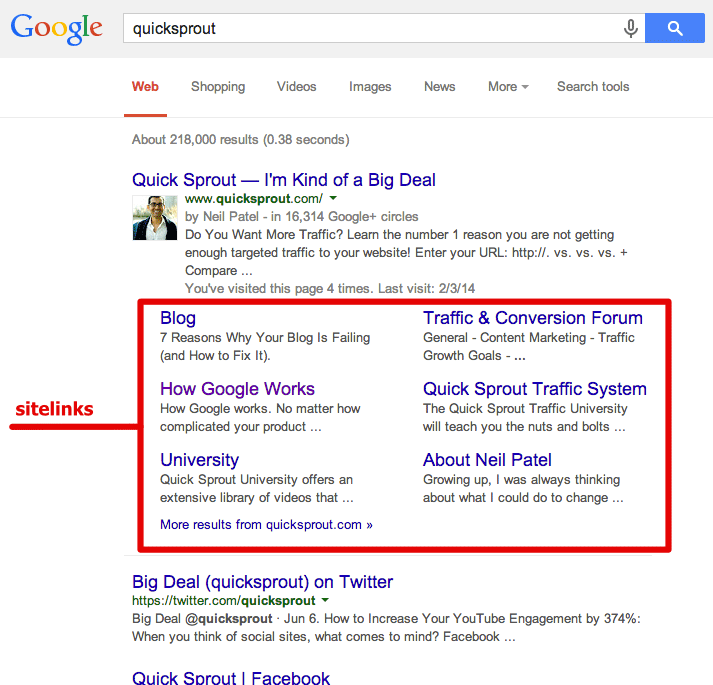
A good site structure provides your site with sitelinks.

Sitelinks are a listing format in the SERPs that show your site’s main page along with several internal links indented below. You’ve seen them before.

quicksprout in serps

Sitelinks are a huge SEO advantage. They increase the navigability of your site, point users to the most relevant information, increase your brand’s reputation, improve user trust, help you dominate SERPs, increase clickthrough rate, and shorten the conversion funnel. Basically, sitelinks are awesome.

But how do you get sitelinks? You don’t simply go to Google Webmaster Tools and fill in a few fields on a form. You can’t issue a sitelink request. Instead, Google’s algorithm automatically awards websites with sitelinks. And they do so based on great site structure.

If you have a poor site structure, it’s very likely that your site will never receive site links. The absence of sitelinks could be costing your site more targeted traffic, higher CTR, and increased conversions.
A good structure means better crawling.

Web crawlers like Googlebot crawl a website’s structure. Their goal is to index the content in order to return it in search results. The better your site structure, the easier the crawlers can access and index the content.

Crawler’s don’t automatically discover everything on your website. Google even admits, “[there are] pages on your site we might not…discover,” or “URLs that may not be discoverable by Google’s normal crawling process.” (That’s one of the reasons why Sitemaps are necessary.) However, crawlers will have a far easier time accessing, crawling, indexing, and returning the pages of a site with strong structure.

A good site structure is at the very core of good SEO — optimizing for the crawlers.

To sum up, your site’s organization paves the way for SEO success. In fact, it could be argued, that without a good site structure, you will never have SEO success. Strong site structure gives your site an unbreakable SEO foundation that will provide you with vast amounts of organic search.

Six Steps to Creating Site Structure

Now, I’ll tell you how to create this kind of site structure.

1. Plan out a hierarchy before you develop your website.

If you’re starting a website from scratch, you’re in a great position to plan out site structure for the best SEO possible. Even before you start creating pages in a CMS, plan out your structure. You can do it on a whiteboard, a spreadsheet program (Excel, Google Drive Spreadsheets), most word processors, or something like Visio or OmniGraffle.

A “hierarchy” is nothing more than a way to organize your information — something that is simple and makes sense. Your hierarchy will also become your navigation and your URL structure, so everything important begins here.
Generally, a site hierarchy looks like this:
website breakdown
There are a few features of hierarchy that you should keep in mind.
  • Make your hierarchy logical. Don’t overthink or overcomplicate this process. You want simplicity, both for your own sake and for the ease of crawlers and users. Each main category should be unique and distinct. Each subcategory should somehow relate to the main category under which it is located.
  • Keep the number of main categories between two and seven. Unless you’re Amazon.com, you don’t want to have too many main categories. There should be only a few main things. If you have more than seven, you may want to rethink the organization, and pare it down a bit.
  • Try to balance the amount of subcategories within each category. Basically, try to keep it approximately even. If one main category has fourteen subcategories, while another main category has only three subcategories, this could become a little unbalanced.
A site hierarchy is the beginning point for a great site structure.

2. Create a URL structure that follows your navigation hierarchy.

The second main element in developing strong site structure is your URL structure. If you’ve logically thought through your hierarchy, this shouldn’t be too difficult. Your URL structure follows your hierarchy.
So, let’s say your hierarchy looks like this:
example site structure
The URL structure for the Chinatown location would look like this:

Your URL structure will be organized according to your site hierarchy. This means, obviously, that your URLs will have real words (not symbols) and appropriate keyword coverage.

3. Create your site navigation in HTML or CSS.

When you create your navigation, keep the coding simple. HTML and CSS are your safest approach. Coding in JavaScript, Flash, and Ajax will limit the crawler’s ability to cover your site’s well-thought out navigation and hierarchy.

4. Use a shallow depth navigation structure.

Your navigation structure will obviously follow your site hierarchy. Make sure that pages, especially important ones, aren’t buried too deep within the site. Shallow sites work better, both from a usability and crawler perspective, as noted in this Search Engine Journal article:

A shallow website (that is, one that requires three or fewer clicks to reach every page) is far more preferable than a deep website (which requires lengthy strings of clicks to see every page on your site).

5. Create a header that lists your main navigation pages.

Your top header should list out your main pages. That’s it. My website, Neilpatel.com uses a very simple top navigational header with three subcategories. This accomplishes everything I need.
neil patel site structure
Adding any other menu elements apart from your main categories can become distracting and unnecessary. If you’ve designed a parallax site, be sure to provide a persistent header menu that displays through each scrolling phase.

While dropdown menus using CSS effects or disappearing menus may provide a unique or intriguing user experience, they do not enhance SEO. I advise against them. I also advise against using an image-based navigational structure. Text links with appropriate anchors provide the strongest form of SEO.

If you have a footer with menu links, be sure to duplicate the main links of your top navigational menu in your footer navigation menu. Changing the order of links or adding additional category listing will complicate the user experience.

6. Develop a comprehensive internal linking structure.

Internal linking puts meat on the bones of a logical site hierarchy. Moz’s article on internal links lists three reasons why they are important:
  • They allow users to navigate a website.
  • They help establish information hierarchy for the given website.
  • They help spread link juice (ranking power) around websites.
Each of these is directly tied to creating a tight-knit and well-integrated site structure.

There’s no need to get complicated with internal linking. The basic idea is that every page on your website should have some link to and some link from another page on the website. Your navigation should accomplish internal linking to the main categories and subcategory pages, but you should also make sure that leaf-level pages have internal linking as well.

Internal linking tells the search engines what pages are important, and how to get there. The more internal linking you have across all pages, the better.


Tuesday, 22 July 2014

Why You Need a Social Media Management Company


Most business owners understand the importance of a social media presence but often cite three reasons why they don’t spend as much time on it as they should:

1. I don’t have time to visit my social accounts every day

2. I don’t know what makes a good tweet or update

3. I can’t keep up with best practices on all the different channels

That’s understandable! It seems like as soon as you get used to a social media channel, the company changes the rules. Just as you learn to construct the perfect update for one social site, everyone is talking about a new site that you just “have to be on.” Once you get good at posting pictures on your social channels, suddenly it’s de rigeur to post video instead.

It’s enough to make any CEO throw up their hands in frustration and go back to print media forever. This is where social media management companies can help your business shine. Hiring a team of experts who live and breathe social media helps you avoid the frustration of staying current on the latest dos and don’ts and keeps your social channels running smoothly so you’re free to run your business.

According to a study by customer relationship management vendor Constant Contact, small businesses owners spend as much as 33 hours a week on marketing activities. That’s nearly the equivalent of a full-time employee! It’s clear that outsourcing social media is a game-changer for anyone who wants to maximize their social impact without taking a toll on the people running the ship.

Even one social media channel takes a lot of time to run effectively. Here’s just some of what goes into managing just one account:

●  Creating an editorial calendar

●  Writing the perfect update, sometime within a strict character count

●  Responding to messages left on your timeline

●  Replying to private messages from customers

●  Engaging with other thought leaders in your industry

●  Finding great re-shareable content to be a good social media citizen

● Frequent daily monitoring of the account to quickly respond to followers or customers

●  Regular analytics reviews to determine the best content to post, what time of day to post it, etc

Now multiply that by the number of social media channels you have (or want) and you can see how quickly the hours stack up. The small business owners who responded to Constant Contact’s survey report that their time is worth at least $273 per hour -- it’s no wonder why so many see the benefit of outsourcing their social media.

In addition to the obvious cost benefit of outsourcing, don’t underestimate how helpful it is to have someone monitoring your channels around the clock and on weekends. Customers can pop up with comments or questions at any time of day. When you hire a social media management team you can enjoy much-needed time away from your computer without worrying about what’s happening on your Twitter or Facebook timeline.

Perhaps the biggest benefit to outsourcing your social media is the peace of mind of having one less thing to worry about. You can’t put a price tag on that. You can rest easy knowing that if a social site suddenly changes up the rules or an important conversation springs up about your industry, the team is on top of it right away.

Many business owners say the key to success lies in delegating tasks to people who are experts in the field. When it comes to the nuanced world of social media, it’s tough to stay on top of the avalanche of new ideas. Bringing a social media management company on board is the only “best practice” you need to know! 


Tuesday, 8 July 2014

Mobile Now Exceeds PC: The Biggest Shift Since the Internet Began

If you’re still struggling to leverage the website to support goals, you have some catching up to do, as the landscape has recently experienced a tectonic shift.

Mobile Exceeds PC Internet Usage for First Time in History

In early 2014, the landscape in which businesses operate changed forever when Internet usage on mobile devices exceeded PC usage.

Time Spent on Internet Desktop vs Mobile

It has taken considerable time for businesses and brands to embrace the potential of the Internet. Today, most recognize the Internet as a vital foundation for everything from operations to marketing and sales to logistics, CRM, and customer service.

Still, many businesses and brands struggle to truly leverage the digital landscape to meet the expectations of their customers. Many more will struggle with the migration of audiences (customers) to mobile.

The time has come to seriously consider integration of mobile-friendly versions of all mission-critical assets: applications, data, the website, communications, demos, sales materials, customer service, etc.

What Are Consumers Doing on Mobile?

How do consumers use mobile devices to access the Web? According to Online Publishers Association/Frank N. Magid Associates:
  • 99.5 percent access content/information
  • 63.1 access the Internet
  • 62.1 percent check email
  • 49.2 percent listen to music
  • 46 percent play games
  • 41.7 percent download and use apps
  • 15 percent make purchases
  • 15 percent read a book

Shift to Mobile Impacts B2B Significantly

If you imagine that the mobile usage is merely a reflection of consumers logging onto social media, checking email or conducting search, or shopping, think again.

Executives lead the way in mobile adoption, validating the theory that digital assets for a business or brand must serve target audiences 24/7, and not just during business hours.

What Time of Day Do B2B Professionals Conduct Mobile Research

Meeting your customers wherever they work is no longer a luxury – it is a necessity. If you wish to convert interaction to action you must compel the decision-maker.

B2B Decision-Makers Rely on Mobile Devices

Mobile is preferred over the PC for executives conducting research during and after office hours, according to the IDG Global Mobile Survey 2014.
  • 92 percent of executives own a smartphone used for business.
  • 77 percent of executives use their smartphone to research a product or service for their business.
  • 93 percent of executives will purchase that product via the Internet using a laptop or desktop.
  • 86 percent use their tablet and 72 percent of executives use their smartphone to conduct research for products or services for their business.
Business Product Research on Mobile

Executives rely upon mobile devices (tablets and smartphones) to conduct business research more frequently in the evenings than any other time of day.

Mobile as a Competitive Advantage

Whether your day-to-day focus is business management, marketing, sales, SEO, social media, advertising, software development, or customer relationship management, the mobile device has increasingly become the preferred tool for work and communication. How quickly and effectively an organization plans, develops, and adapts to deliver quality mobile experiences will likely become a competitive advantage.


Some organizations may continue to view mobile as an “add-on” or supplementary effort when planning for digital interaction with customers. However, those who embrace the shift in behavior and deliver what their customers want and need to make a purchase decision will likely be the ultimate winners.

Full view on this post visit here


Friday, 4 July 2014

Digital Media Marketing: Making The Most of Mobile Email Marketing


What was the first thing you did this morning after you woke up? Brushed your teeth? Turned on SportsCenter? Ate some nice, fiber-filled cereal?
I checked email on my phone.
Surprised? Well, according to a 2013 study, 49 percent of mobile users read emails on their smartphones immediately when they wake up.
That’s half of everyone with a smartphone firing up their inboxes, first thing in the morning before they even set foot out of bed.
As a business owner and marketer, you want into those bedrooms.
By following some essential steps for mobile email marketing, you can!
Write killer headlines to get your email opened:
Write a subject line that is five to seven words long, no more, no less.

Provide value, be specific, be compelling, and create urgency.
Play on buyer personas and psychological triggers.
Be clear, succinct and consistent in your message:
Focus on your readers’ needs, wants, and feelings.
Create a “value exchange” where you provide great content for your readers’ (limited) time.
Assuage any fears directly. Give readers confidence in you as an authority with an easy-to-read message.
Be persuasive. Everyone from Aristotle to Obama knows the importance of effective persuasion. Convince your readers that they should act, in a subtle yet direct way.
Organize for maximum readabilty on mobile devices:
Make your email look spectacular on mobile - easy to read and full of “alt-tagged” images and hyperlinks with plenty of space around them for easy clickability.
Divide the layout of your email into short sections for clearer navigation.
Send a plain text version of your email to include readers with less sophisticated technology.
Get personal with your emails:
Use your readers’ interests to learn who your readers are.
Establish authority as a likeable expert through niche-specific, high-quality content.
Use autoresponders to create a universal experience from your first subscriber to your last.
Ask your readers to “whitelist” you to keep your emails out of their spam folder.

Test, analyze, change, and resend.
Include a discount or special offer for subscribing
According to Copyblogger, more than 70 percent of mobile purchasing decisions are influenced by promotional emails!
It creates an exclusive community of readers (and consumers) by offering something only subscribers can have, allowing them to benefit in ways that others can’t.
Fifty percent of users say they subscribe to email specifically because of special offers they receive.
So why wait? Reach customers from the comfort of their morning routine; take advantage of digital marketing’s powerful tool, (mobile) email marketing.

Full view on this post